Goji-Project
 Goji Project
Goji is the first ecological calendar platform to use AI-powered question and answering with real-time indicator mapping based on your location. By combining large language models with ecological data, Goji turns seasonal events into an interactive, personalized experience.
Note for the judges: The updates to my backend were made for a swift cloning and Installation Guide. The changes made were moving my requirements.txt to root and changing the path for my files to access the .env file. Originally the .env file was located in the goji-backend directory, but I changed it so that it’s in the root directory.
Inspiration
An ecological calendar is a composition of seasonal indiactors that mark the transitional periods between seasons. For instance, a flower blooming could mark the transitional period between Winter and Spring, or the sighting of bird migrations could represent that Fall is ending.
What if ecological indicators move along hidden paths—higher-dimensional trajectories shaped by complex relationships—beyond what we can easily observe?
This project is a step toward modeling, visualizing, and understanding those invisible interactions—using relivant and updated data, AI interpretation, and ecological theory.
View a demo of Goji here: (https://youtu.be/evHEawFvunQ)
Design
Why Perplexity Sonar API?
Perplexity Sonar API is ideal for an AI engine like Goji because of its:
- Advanced contextual understanding: Sonar handles complex ecological queries with higher nuance and precision compared to most general-purpose LLMs.
- Web-aware architecture: This ability is especially useful for Goji becuase the ecology is constantly changing, and it’s crucial that recent data is considered when making an Ecological Calendar.
- Fast and cost-effective inference: Compared to heavier LLMs, Sonar offered a practical tradeoff between performance and cost for near real-time usage.
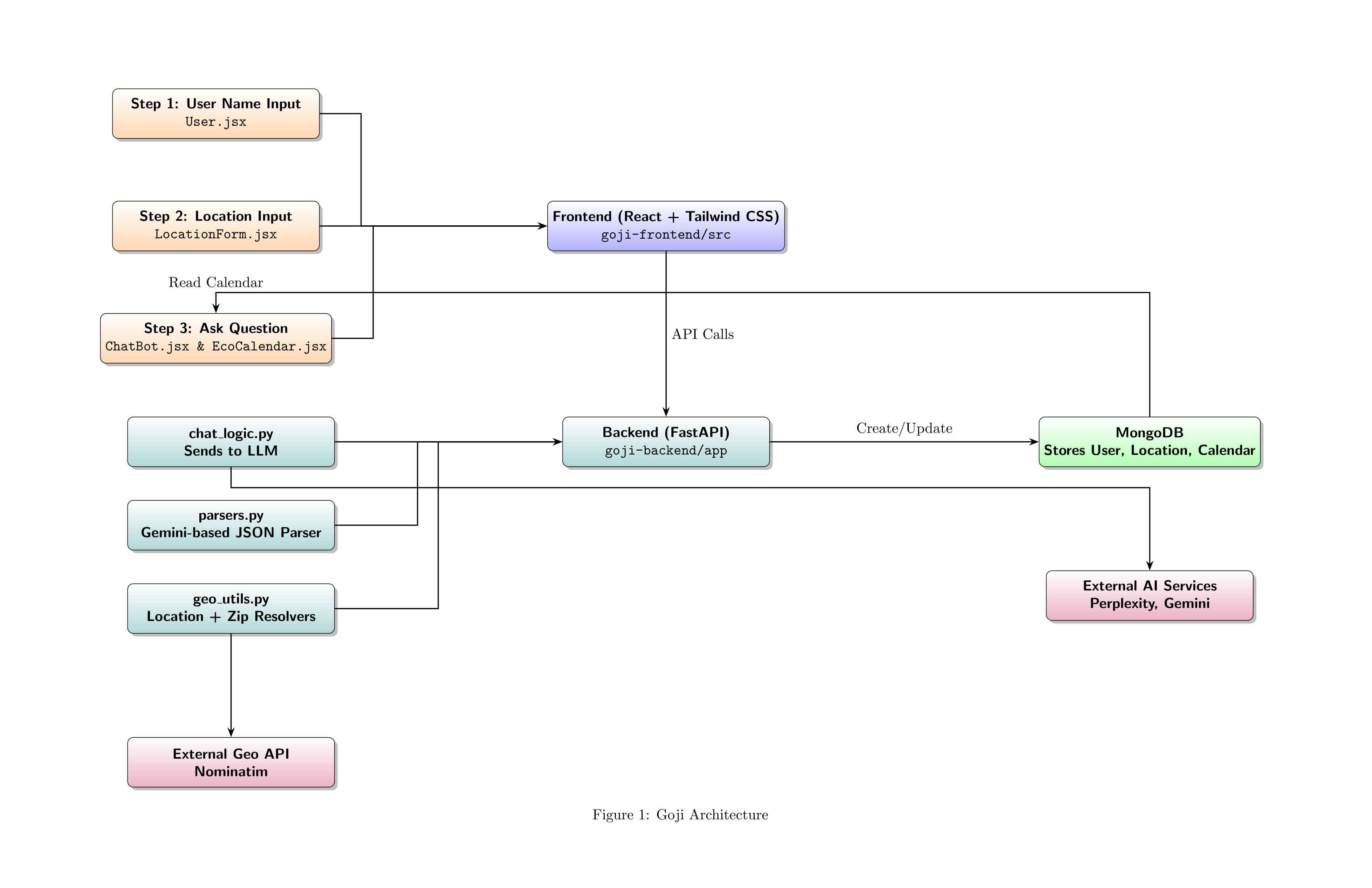
The raw results from Perplexity are passed to Gemini (via parsers.py) for intelligent postprocessing and structuring into a MongoDB-ready JSON format.
Architectural Decisions
Frontend
The frontend is built in React with Tailwind CSS, chosen for:
- Component-based design: Enables modular UI development (e.g.,
ChatBot.jsx,EcoCalendar.jsx, etc.) - Speed and scalability: Tailwind CSS accelerates prototyping and enforces consistent styling across the app.
- Visual clarity: React is ideal for dynamic UI rendering, such as drawing indicator arcs on the calendar in response to JSON data.
Backend
The backend is powered by FastAPI, selected for:
- Speed and async support: Handles multiple external API requests (e.g., Perplexity, Nominatim) efficiently.
- Modular routing and service layer: Routes are cleanly separated from services (e.g.,
chat_logic.py,calendar_service.py), making the codebase scalable and maintainable. - MongoDB integration: Each user has a dedicated document that evolves through the app’s steps: name → location → question → calendar.
Geolocation with Nominatim
Location data is essential to tailoring ecological calendars. We use geo_utils.py to:
- Convert ZIP codes into latitude/longitude
- Perform reverse geocoding for user-friendly location labels
- Normalize geographic input for consistent MongoDB entries
Why This Structure?
Goji is built around a three-stage user journey:
- Identity:
User.jsxcaptures the user’s name → initializes an empty calendar in MongoDB. - Place:
LocationForm.jsxresolves geographic intent usinggeo_utils.py. - Purpose:
ChatBot.jsxcaptures the user’s ecological inquiry → flows throughchat_logic.pyandparsers.py→ results render inEcoCalendar.jsx.
This structure reflects Goji’s core goal: turning curiosity into seasonal, place-based ecological insight, using the strengths of modern LLMs and data pipelines.
Project Structure
This project, as mentioned before, is organized into two parts, a frontend–backend split. Here is the full layout of files and folders:
goji-frontend/
├── .gitignore
├── README.md
├── package.json
├── package-lock.json
├── index.html
├── tailwind.config.mjs
├── vite.config.js
├── eslint.config.js
├── node_modules/
├── public/
│ ├── goji berry mini.png
│ └── vite.svg
├── src/
│ ├── App.css
│ ├── App.jsx
│ ├── index.css
│ ├── main.jsx
│ ├── assets/
│ │ └── react.svg
│ ├── components/
│ │ ├── BackgroundArcs.jsx                   # Uses p5.js to draw Arcs in the background
│ │ ├── CategoryDropdown.jsx
│ │ ├── ChatBot.jsx                          # Chat Box application: Third Page
│ │ ├── EcoCalendar.jsx                      # Ecological Calendar application: Third Page
│ │ ├── LocationForm.jsx                     # Location form entered by user: Second Page
│ │ └── User.jsx                             # Username page: First Page
│ ├── hooks/
│ │ └── useLocationApi.js
│ └── lib/
│ ├── api.js
│ └── geoUtils.js

goji-backend/
├── .env
├── .gitignore
├── README.md
├── requirements.txt
├── venv/
├── json/
│ ├── example.json
│ └── indicator_type_cache.json
├── app/
│ ├── init.py
│ ├── db.py
│ ├── geo_utils.py                           # Location utilities (Nominatim, zip resolution)
│ ├── llm_utils.py                           # Shared AI helpers (if not in services)
│ ├── main.py                                # FastAPI entry point
│ ├── parsers.py                             # Gemini logic for parsing AI results
│ ├── routes/
│ │ ├── calendar.py
│ │ ├── chat.py
│ │ ├── location.py
│ │ ├── update_calendar_location.py
│ │ └── user.py
│ ├── schemas/
│ │ └── calendar_schema.py                   # Pydantic models
│ └── services/
│ ├── calendar_service.py                    # Business logic for calendar building
│ └── chat_logic.py                          # Handles AI querying + pre/postprocessing

## Project Root

├── .git/                                    # Git version control metadata
├── .gitignore                               # Ignored files for Git
├── goji-frontend/                           # React + Tailwind CSS frontend
├── goji-backend/                            # FastAPI backend with LLM, Geo, and Calendar logic

README.md                                    # Project overview and setup instructions
Next Steps & Challenges
Next Steps
- Enhanced Indicator Visualization: Incorporate more dynamic visual layers to represent ecological indicator intensity and frequency.
- User Customization: Allow users to filter, save, and compare ecological calendars across locations and seasons.
- Chat Memory: Let users revisit old chats with Goji. Currently, only calendar data can be retrieved from the user’s previous inquiries.
- I want Goji to have the ability to, once generate an ecological calendar, inform its code from the indicators it drew from Perplexity and Gemini to draw new conclusions about when seasons actually occur. Signs of a season show through the indicators, so if I could have a way to update the calendar itself after it has learned something new about its ecological indicators then maybe it can infer more predictability for when particualr seasonal indicators appear. Such as prediciting when weather patterns occur inferred by insect populations or bird activity.
Challenges
- Parsing AI Responses Reliably: LLM outputs (e.g., from Perplexity + Gemini) are inconsistent and require strict parsing to create usable JSON.
- Geographic Resolution: Determining the most meaningful spatial scale (e.g., zip code vs. ecoregion) for ecological relevance is ongoing.
- Temporal Sensitivity: Seasonal shifts are increasingly unpredictable due to climate change, making “typical” patterns harder to define.
Important
Human ecology takes on a dynamic role. It is not a linear genealogical notion of relatedness (or kinship), but rather a progenerative idea of all-encompassing relationships. Relationships are not closed nor static; they are continuously shaped by external forces that impact the system as a whole. The building of an ecological calendar is an intimate process becuase it recognizes the cocreation of interactions in our natural world. Goji is a tool to assist in cogenerative learning about our beautiful world.
Prerequisites & Installation
Before you start, make sure you have the following installed:
- Python 3.10+ (Download Python)
- Node.js 18+ (Download Node.js)
- MongoDB Atlas (or a local MongoDB server)
Installation Guide
Clone the Repository
git clone https://github.com/romanqc/Goji-Project.git
cd ../Goji-Project
Backend Setup
Set up a Python Virtual Environment
cd goji-backend
python -m venv venv
source venv/bin/activate # On Windows, use `venv\Scripts\activate`
cd ../
pip install -r requirements.txt
cp .env.example .env
The .env you create should look something like the following:
GOOGLE_GEMINI_API_KEY=your_gemini_api_key_here
PERPLEXITY_API_KEY=your_perplexity_api_key_here
MONGODB_URI=your_mongodb_connection_string_here
I am currently using a free Gemini API key, model gemini-2.0-flash-lite, and the free MongoDB starter. Both of these are easy to get:
- The API key for the model of gemini I use can be made here: (https://ai.google.dev/gemini-api/docs/models#gemini-2.0-flash-lite) Just click Try in Google AI Studio and you can create your API key there.
- You can sign up for MongoDB for free by making an account, filling out the starter information, and then for Deploy your Cluster section, click the free option. Name your cluster, then deploy it, and you’ll be given a username and a password. These will be important to making your unique URI link.
Then, run the backend
uvicorn app.main:app --reload
The backend shouold be available and running at http://127.0.0.1:8000, on your local machine.
Frontend Setup
Open a new tab in PowerShell or your command line, and navigate to the root directory Goji-Project. Next, run the following commands:
cd goji-frontend
npm install
npm run dev
The frontend will be available at http://localhost:5173
You can ctrl + click the link in the terminal and it will open the localhost link in your default browser. Make sure that your backend is running so that the frontend can make the API calls. It will not work without the backend.
Contact
Stay tuned for updates.
Roman Q. Chavez (rqc3@cornell.edu)